upcrm

  • Solutions
  • Resources
    • Documentation
    • Blog
    • Upcoming Events
  • Pricing
Request Demo Login
  • Home
  • documentation
  • personal settings
  • tag manager
  • getting started
  • contact screens
    • dashboard
    • search
    • appointments
    • working with contacts
    • to feature
  • daily followup
    • focused followup
    • due to call
    • unworked
    • transfers
    • late followup
  • activity logs
    • followup log
    • prospecting log
    • phone log
  • reports
    • followup comparison
    • prospect comparison
    • phone comparison
  • desktop phone
  • user management
    • manage users
    • manage groups
  • personal settings
    • tag manager
    • switching apps
    • notifications
  • management settings
    • data settings
    • system settings
    • customizing contact records
    • customizing account records
    • customizing record types
    • field collections
  • mobile app
    • getting started
    • follow up tab
    • tasks tab
    • appointments tab
    • more tab
    • contact cards

Tag Manager

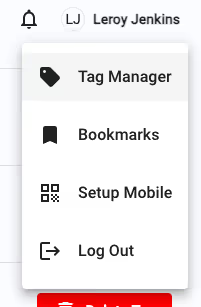
The Tag Manager settings can be accessed by Managers and Admins from the User Management menu, and by Sales users from their user settings menu by clicking on their name. Tags are unique to each individual user, but can be managed globally by Managers and Admins from the User Management menu.
upcrm

There is more to read here, see all that UpCrm has to offer. Schedule a demo today!

Already have an account with the UpCrm app?

Login
personal settings switching apps

upcrm

Get control and keep control

Get Started

Contact

info@activelamp.com
(310) 943-0246
12655 W. Jefferson Blvd. Suite 400
Los Angeles, CA 90066
Copyright 2023, Active Dealer. All rights reserved.
Sitemap Terms of Service Privacy Policy

upcrm

  • Solutions
  • Resources
    • Documentation
    • Blog
    • Upcoming Events
  • Pricing
  • TALK TO SALES
  • CREATE WORKSPACE